
Custom Clinic Website
// Built to Earn Trust
Rank Higher & Drive Appointmentsd
Your website is your clinic’s front desk. Before patients call, they search, compare, and decide online. A custom clinic website from SMPLY Studio blends strategy, compliant UX, and technical performance so people instantly understand what you do, why they should trust you, and how to book now.
What you gain:
Discoverability:
search-aligned architecture and clinic-level SEO
Trust:
Physician credentials, affiliations, insurance panels, outcomes language
Conversion:
Online booking, secure forms, WhatsApp/call CTAs, clear next steps
Inclusion & compliance:
WCAG accessibility patterns, SSL, consent language,
privacy by design
Speed:
mobile-first pages that meet Core Web Vitals targets

// Features
What Makes Our Websites Convert

SEO Friendly Website (Editable CMS)
Edit pages & blogs in minutes

Local SEO Setup That Helps You Rank on Google
Rank better for local service searches

Lead Tracking & Conversion Analytics
Track calls, forms, and booking
Online Booking & Payments That Convert
Make booking fast and hassle-free

Fast, Mobile-First Websites Optimized for Core Web Vitals
Built for performance and SEO

Trust-Building Design That Turns Visitors Into Clients
Design that earns trust instantly
Ready to grow your business with smart design & digital strategy?
Why a custom clinic website (not another template)?
You’re unique. Your specialties, workflows, insurance panels, and location mix require content and navigation tailored to your patient journeys.
Credibility is earned in seconds. Clean structure, plain-language content, and real proof (bios, awards, memberships) reduce bounce.
Front-desk load drops. Clear info, online booking, and self-service resources cut repetitive calls and no-shows
Search works better. One page per service/condition, internal links, and schema help you win “near me” and procedure queries.
// What a conversion ready
What a conversion-ready clinic website looks like
1. Patient-first UX
• Simple navigation and scannable sections; readable typography and contrast
• Clear next steps everywhere: Book, Call, WhatsApp, Find a location
2. Mobile-first performance
• Targets: LCP < 2.5s, CLS < 0.1, INP < 200 ms on real devices • Optimized media (WebP/AVIF), deferred scripts, minimal layout shifts
3. Search-ready structure • One service/condition per page to avoid keyword cannibalization • Descriptive H2s that map to intent (Symptoms, Diagnosis, Options, Risks & Recovery) • Schema: MedicalOrganization, MedicalClinic/LocalBusiness, Physician, Service, FAQPage, BreadcrumbList
4. Accessibility & inclusion (WCAG 2.1 AA)
• Color contrast, keyboard nav, focus states, alt text, semantic headings, descriptive links
• Captions/transcripts for media; multilingual support where relevant
5. Trust & compliance signals
• Board certifications, memberships, affiliations, insurance/payment info
• SSL sitewide, consent near forms, cookie notice where required; PHI minimization
• Clear privacy policy & disclaimers (we implement best-practice technical patterns; follow your legal counsel)
6. Conversion paths everywhere
• Sticky Book/Call/WhatsApp CTAs on mobile
• Short, secure forms; thank-you pages with next steps and prep resources
• Contextual CTAs by specialty (“Book Dermatology consult in [City]”)
Information Architecture you can copy
• Home – positioning, specialties, proof band, key CTAs
• Specialties / Departments – dermatology, pediatrics, physiotherapy, ENT, women’s health, etc.
• Conditions & Treatments – one URL per topic (Symptoms → Diagnosis → Options → Risks & Recovery → When to Seek Care → FAQs)
• Doctors / Team – bios, subspecialties, languages, hospital affiliations, booking links
• Locations – unique pages with map, hours, parking, accessibility, photos; consistent NAP
• Telemedicine – eligibility, platform steps, secure access
• Patient Resources – forms, insurance, billing FAQs, prep & aftercare
• Blog / Insights – Q&A, prevention, comparisons, seasonal content
• Contact / Book – tap-to-call, WhatsApp, secure request form
Tip: If you serve multiple cities, create city pages (“Clinic in [City]”) with local details and internal links from specialties to that city page. This is essential for local SEO.
Patient-centric features we build in
1) Mobile-first layout & navigation
• Tap-friendly menus and cards; “Find a location” always one tap away
• Sticky CTAs and micro-FAQs that collapse on small screens
2) Performance & Core Web Vitals
• Image compression, responsive srcset, lazy-loading
• Preconnect fonts/CDN; defer non-critical JS; minify and inline critical CSS
• Ongoing monitoring via Search Console and RUM
3) Booking & secure forms
• Encrypted endpoints, spam protection, consent & purpose statements
• Minimal PHI collection; route sensitive data to portals
• Auto-confirmation with next steps; calendar add-to where suitable
4) Local SEO
• Optimized Google Business Profile (categories, services, booking, photos, Q&A, posts)
• Consistent citations in registries/directories; city pages with embedded maps
• Review prompts (where allowed) that encourage service + city mentions
5) Trust bands
• Certifications, affiliations, awards; patient counts and response times
• Insurance and payment options near each specialty
6) Content system that scales
• Reusable blocks (doctor cards, location cards, FAQs, trust strips)
• Templates for Specialty, Condition, Doctor, Location, Resource, Blog
• Editor training so your team can publish fast without breaking design
Content that ranks (and reduces calls)
High-value page types
• Service pages — indications, benefits, risks, recovery, candidacy, FAQs
• Condition pages — symptoms, diagnosis, options, when to seek care, FAQs
• Doctor profiles — credentials, hospital privileges, languages, booking links
• Location pages — local landmarks, transit, parking, accessibility notes
• Patient education — checklists, timelines, comparisons in plain language
Editorial principles
• Write at a 6th–8th grade reading level; define medical terms in context
• Short paragraphs (2–4 lines), bullets, tables; add diagrams with alt text
• Cite reputable sources sparingly; avoid sensational claims
• Refresh quarterly from front-desk questions and seasonal topics
Design patterns that improve patient confidence
• Reassurance near CTAs (board-certified team, response time, privacy note)
• Contextual contact options: Call for urgent queries; WhatsApp for quick questions; forms for scheduling
• Aftercare and preparation resources linked from specialty pages
• Transparent expectations: wait times, prep instructions, recovery windows
Security, privacy & accessibility (non-negotiables)
• TLS/SSL on every page; secure headers; hardened CMS with role-based access
• Cookie consent with Accept/Reject/Manage where needed
• Form security: honeypots, rate limiting, reCAPTCHA/turnstile; PHI minimization
• WCAG 2.1 AA checks: contrast, keyboard nav, focus, labels, semantic headings
• Backups & updates: automated schedule and restore tests
(We don’t provide legal advice; we implement best-practice technical patterns and follow your counsel’s guidance.)
SEO checklist for a custom clinic website
• One topic per URL; avoid combining multiple services on one page
• H1 matches the page focus; first 100 words restate service and city
• Internals: specialties ↔ conditions ↔ doctors ↔ locations ↔ Contact/Book
• Structured data (Organization, MedicalClinic/LocalBusiness, Physician, Service, FAQPage, BreadcrumbList)
• Media SEO: descriptive filenames, alt text, width/height set to prevent CLS
• XML sitemaps by content type; clean canonicals; redirect map on launch
Measurement & continuous improvement
• Primary conversions: appointment requests, call clicks, WhatsApp starts, portal logins
• Assists: time on service/condition pages, scroll depth, downloads
• Monthly insights: move CTAs, shorten forms, expand high-intent topics, add city pages
• Roadmap: publish a service page each month; add FAQs from real patient questions
// Featured Website
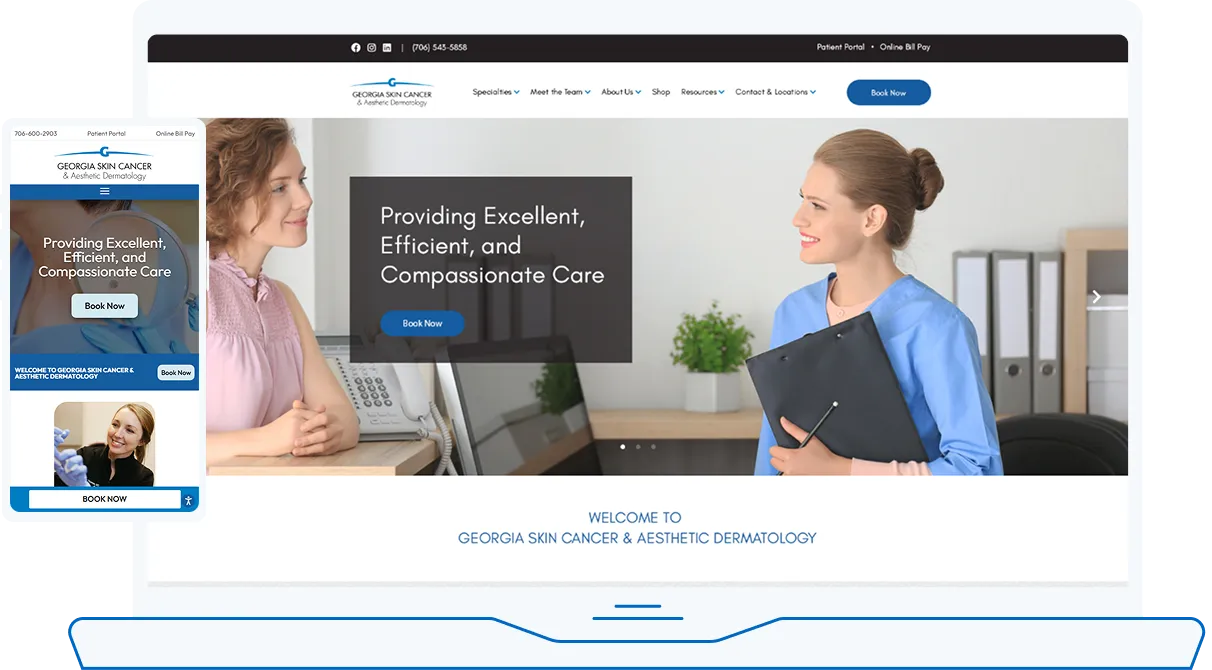
Skin Cancer & Aesthetic Dermatology
No Post Found.
Explore our portfolio:
// FAQs
FAQs: Custom Clinic Website
What makes a clinic website truly “custom”?
It’s aligned to your specialties, workflows, insurance panels, and local audience—built on a flexible architecture with patient-first UX, secure forms, and measurable conversion paths.
Can you integrate online booking and secure forms?
Yes. We connect to scheduling tools and implement encrypted request forms with minimal PHI, consent language, and clear next steps
How do you ensure search visibility for services?
We map one service/condition per page, add structured data, and build internal links so Google understands the relationships across your site.
How do you handle accessibility and multilingual needs?
Handled correctly, it improves them. We preserve/redirect valuable URLs, improve speed, add schema, and strengthen internal links—usually lifting visibility and inquiries.
Can you support multiple providers or locations?
Yes—create team and location hubs with unique pages, then interlink to services and booking for a seamless journey.
Will a custom site reduce front-desk load?
Typically yes. Clear information, online booking, and self-service resources lower repetitive calls and reduce no-shows.
Ready to launch a clinic website that patients trust- and that actually converts?
Book a free consult. We’ll audit your current site, outline quick wins, and map the pages that can rank fastest in your city.